Desperation. Trying anything. Every time you add a series, it asks for a path. What I was doing before wasn’t working, so trying new options.
You haven’t posted a new screenshot since I told you to change it 7 hours ago and the error is still the same, so unless you changed it and didn’t post a screenshot and in the process changes something else then
The error has been the same for weeks, regardless of the directory chose. The screen shots posted are the latest. You are saying fix it, and I obviously have no idea how to fix it because anything I am trying continues to be inaccurate. I have been asking for clarity on this, screen shots would help.
There have been several times I’ve asked explicit questions and you said something completely different in your reply and I’ve had to ask again and again and you haven’t asked a specific question about how to answer it if you didn’t know.
Every question has been answered to the best of my knowledge. List the questions with numbers all in a row and I will answer them again.
Docker > Sonarr > Inspect
This used to be ~/pixelrogue/MediaCenter/raw
Changed this to /Users/pixelrogue/MediaCenter/raw (because that is what I understood as asked)
Before you change another setting change the remote path mapping (They’re in the same place as they were when you took a screenshot 7 hours ago, before I told you to change them).
Host: leave it as is
Remote Path: /Users/pixelrogue/MediaCenter/raw/
Local: /-data/raw/
I have tried this… have no idea what this means if what I have been trying is not what you are asking about. Wish I knew which of these screens you are even referencing…where is the remote path mapping (and yes, I have asked this several times in the past 7 hours.) I have guessed and tried… no idea where it is or which is one is being references. Which application? Which path to get to those specific fields. Can you please tell me exactly where these fields are? In the mean time I will look and continue to try.
Sonar > Settings > Media Management > Root Folders. This only allows to select from a specific predefined group… and /-data is the only item that seems close to anything usable. That is what is selected here.
Sonar > Settings > General > Host – these are being ignored.
Sonar > Series > (select series) > Edit > Path (no idea if this is local or remote)
/Users/pixelrogue/MediaCenter/raw/Bobs.Burgers.Series
This was ~/pixelrogue/. → CHANGED IT based on input earlier in the thread.
Tried others here as well, from a collective new folder to existing folders.
This one will not go to /raw (error posted earlier in this thread)
Tried another series to /raw. no difference.
Sonar > Settings > Download Clients
This one most closely machine’s the information above.
Host: host.docker.internal
Remote Path: ~/MediaCenter/raw
Local Path: /-data/raw/
I had changed other paths that were ~/pixelrogue to /Users/pixelrogue and did know the request was for the this panel. See that now.
the files are showing in looking at /-data/
Choices:
Type	Name
	app
	bin
	config
	-data
	defaults
	dev
	etc
	home
	lib
	lib64
	libexec
	media
	mnt
	opt
	proc
	root
	run
	sbin
	srv
	sys
	tmp
	usr
	var
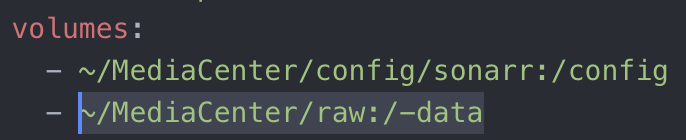
So pressing that the option to select here would be data
– files are showing here
– config file maps /raw to /-data
– path of /-data/raw/ generates errors
Hopefully this is correct
Clearing logs in hopes that the error shows signs of being fixed…
- new error: Series’ root folder (/Users/pixelrogue/MediaCenter/raw) doesn’t exist.
Downloading another file as a test for the updated information.


